Showing posts with label sequence. Show all posts

Wednesday, February 16, 2011

WSO2 ESB Tips & Tricks 06: Error Handling Semantics

Sequence error handling is one of the most useful yet undervalued features of WSO2 ESB. Sequence error handling brings Java try-catch like semantics into the ESB mediation flow. However, error handling semantics of WSO2 ESB slightly varies, depending on how the sequences are setup in the ESB. This seems to generate lot of confusion around the concept of ESB error handling. For those who find it difficult to understand the error handling capabilities of WSO2 ESB, following guidelines might help:
  1. If a sequence explicitly defines a fault handler using the ‘onError’ attribute, the specified fault handler will be invoked, whenever an error occurs in the sequence. This is true even if the sequence is invoked by a proxy service.
  2. If a request arrives through the main sequence and if it happens to fail within a sequence which does not explicitly define a fault handler, the default ‘fault’ sequence will be invoked.
  3. If a request arrives through a proxy service and if it happens to fail within a sequence which does not explicitly define a fault handler, the fault sequence of the proxy service will be invoked. If the proxy service does not define a fault sequence, then no fault handler will be invoked.
  4. When there is a fault handler engaged at proxy service level, and another error handler engaged at the sequence level, the sequence level error handler gets invoked in case of an error (as per rule 1). In this case the proxy service fault sequence is ignored.
To learn more about WSO2 ESB error handling, please refer the previous installment of the tips and tricks series.

Saturday, April 24, 2010

WSO2 ESB Tips & Tricks 05: Error Handling with Sequences and Proxy Services

The job of an Enterprise Service Bus is to act as the backbone of an organization’s SOA. It is the spine through which all the systems and applications within the enterprise communicate with each other. At times an ESB might even help to integrate internal systems with external applications so that complex cross cutting business tasks such as supply chain management and customer relationship management can be carried out with precision and in perfect synchronism. As such an ESB often has to deal with many wire level protocols, messaging standards and remote APIs. But applications and networks are full of errors. Applications often crash due to various bugs. Network routers and links often get into states where they cannot pass messages through with the expected efficiency. These error conditions are very likely to cause a fault or trigger a runtime exception in the ESB. A good ESB should provide simple yet powerful mechanisms for dealing with such errors. So today, I’m going to discuss a little bit about error handling options provided in WSO2 ESB.
WSO2 ESB gives you the concept of fault sequences. A fault sequence is just like any other sequence, a collection of mediators. A fault sequence can be associated with another sequence or a proxy service. When the sequence or the proxy service encounters an error during mediation or while forwarding a message out, the message which triggered the error will be delegated to the specified fault sequence. Using the available mediators we can log the erroneous message, forward it to a special error tracking service, send a SOAP fault back to the client indicating the error or even send a mail to the system admin. It is not mandatory to associate each sequence and proxy service with a fault sequence. In situations where a fault sequence is not specified explicitly, a default fault sequence will be used to handle errors. Sample 4 in WSO2 ESB documentation shows how to specify a fault sequence with a regular mediation sequence.
Whenever an error occurs in WSO2 ESB, the mediation engine attempts to provide as much information as possible on the error to the user. This is done by initializing a set of property values on the erroneous message. These properties are:
  • ERROR_CODE
  • ERROR_MESSAGE
  • ERROR_DETAIL
  • ERROR_EXCEPTION
Within the fault sequence we can access these property values using the get-property XPath function. Sample 4 uses the log mediator as follows to log the actual error message:
<log level="custom">
<property name="text" value="An unexpected error occured"/>
<property name="message" expression="get-property('ERROR_MESSAGE')"/>
</log>
Note how the ERROR_MESSAGE property is being used to get the error message text. You can also write special custom mediators for error handling tasks. In such cases you can use the MessageContext API to retrieve above mentioned property values from the message.
String errorMsg = (String) messageContext.getProperty(“ERROR_MESSAGE”);
Exception e = (Exception) messageContext.getProperty(“ERROR_EXCEPTION”);
WSO2 ESB also makes it possible to send a SOAP fault back to the client whenever an exception occurs in the ESB. This is done using the makeFault mediator. The makeFault mediator converts the current message into a SOAP fault. The user can specify the error code and the reason statement to be included in the fault message. Once the SOAP fault is constructed it can be sent to the client using the send mediator. Sample 5 in WSO2 ESB documentation shows exactly how to do this. Here’s the makeFault mediator configuration from sample 5:
<makefault>
<code value="tns:Receiver" xmlns:tns="http://www.w3.org/2003/05/soap-envelope"/>
<reason expression="get-property('ERROR_MESSAGE')"/>
</makefault>
Note how the ERROR_MESSAGE property is used to set the original error message as the reason phrase of the SOAP fault. Keep in mind that the makeFault mediator only converts the message into a fault message. To send it to a client or an endpoint you need to use the send mediator. In sample 5 we mark the message as a response using the property mediator and invoke the send mediator so that it is sent back to the client which sent the original request.
Assume you want to send an E-Mail to the system admin whenever the ESB encounters an error. How do you do it? You simply need to enable the mail transport sender in the ESB configuration (by editing the axis2.xml file or using the UI). Configure the transport sender with the appropriate mail server settings. Then in your fault sequence you can simply use the send mediator as follows to send an E-Mail out.
<property name="Subject" value="An Error Occurred in the ESB" scope="transport"/>
<property name="OUT_ONLY" value="true"/>
<send>
<endpoint>
<address uri=”mailto:admin@yourdomain.com”/>
</endpoint>
</send>
So these are the error handling options available for sequences and proxy services in WSO2 ESB. It also provides some more error handling options for endpoints. That however is a different matter entirely and hence I’m leaving it for a future blog post.

Friday, November 20, 2009

WSO2 ESB Tips & Tricks 01: Sequences and Proxy Services

As promised, here is the first article of the “WSO2 ESB Tips & Tricks” series. The main objective of this post is to introduce two very important functional components of the ESB, namely sequences and proxy services. These are perhaps the most commonly used functional components of WSO2 ESB. They can be used to implement even the most complex of messaging systems and enterprise integration patterns using the service bus. During the course of this article I will briefly explain some of the use cases of sequences and proxy services along with some useful information on how to use them in WSO2 ESB.
WSO2 ESB supports four modes of operation.
  1. Service mediation
  2. Message mediation
  3. Task scheduling
  4. Eventing
In the service mediation mode, WSO2 ESB acts as a proxy to a real Web Service hosted in a Web Services container like Apache Axis2 or WSO2 WSAS. The ESB exposes a virtual Web Service which can accept requests from clients. The requests are processed, mediated and forwarded to the actual service implementation by the ESB. Any responses coming from the service implementation are mediated and forwarded to the clients. Proxy services are used to get the ESB operating in this mode.
In the message mediation mode, WSO2 ESB functions as a message router. It can filter, transform, drop messages or forward them to remote endpoints for further processing when operating in this mode. Sequences are used to define the message mediation behavior of the ESB. A sequence is a series of mediators, where each mediator is an entity that can accept messages and carry out a predefined task on them. WSO2 ESB provides you with a wide range of mediators designed to carry out various processing tasks on the messages. You can mix and match these available mediators to develop sequences. For instance a sequence comprising of the log mediator and the send mediator will act as a simple log-and-forward message flow. You can have any number of mediators in a sequence and a sequence can also dispatch messages to other sequences if needed.
A proxy service is a combination of three sequences and a target endpoint. The target endpoint is for the actual service implementation to which the messages will be forwarded after mediation. The three sequences are as follows.
  • In-sequence: All the incoming requests to the proxy service are dispatched to the in-sequence. This sequence defines how the requests should be processed before forwarding them to the target endpoint.
  • Out-sequence: All the responses coming back from the backend service implementation are dispatched to this sequence. It defines how the responses should be handled before sending them back to the clients. The out sequence can also forward the responses to a given service endpoint, thus effectively linking up multiple services. This way a single request to the proxy service will trigger multiple service invocations. The response from the 1st service is fed to the 2nd service as the request.
  • Fault sequence: If an error occurs during service mediation the faulty message is handed to the fault sequence for error handling work. Depending on our requirements the fault sequence can be used log the error, ignore it or send a SOAP fault back to the client indicating that something went wrong.
Now that you have a basic understanding of sequences and proxy services let’s take a look at some of the use cases where these components come in handy. Proxy services can be used to expose an existing service over a different schema (message format). In scenarios like this one, proxy services can transform the messages flowing back and forth. Also since proxy services can be exposed over multiple transports they can be used to expose an existing service over a different transport. For an example we can take a simple HTTP service and expose it over JMS by creating a proxy service for the HTTP service and exposing it over JMS. The ESB will take care of switching the communication protocols. In addition, proxy services are useful in adding QoS features (security, RM etc) to ordinary message flows. As an example, we can take an unsecured service, create a proxy service for it and engage security on the proxy service to add security to the backend service implementation.
Sequences can be used to audit, filter, control and transform messages flowing through a network. Certain advanced features like access control, load balancing and fail over are also possible with sequences. In WSO2 ESB all the incoming messages which are not destined to a proxy service are dispatched to the “main” sequence. The main sequence can further distribute them to other sequences and they in turns can call even more sequences. This is somewhat analogous to how a C program works. The application runtime invokes the main procedure and it in turns can call other procedures.
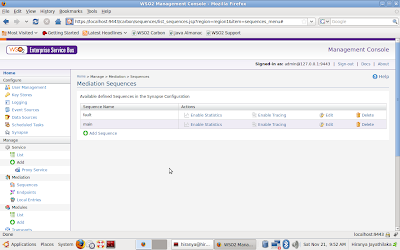
Enough with the theory! Let’s get practical and see how to create sequences and proxy services in WSO2 ESB. Here actually you have several options. You can either use the XML based Synapse configuration language to define sequences and proxy services, or use the set of graphical tools that come with WSO2 ESB. To create a sequence graphically, first start the ESB server and logon to the management console. (By default the web based console is accessible at https://localhost:9443/carbon) Sign in as an administrator (By default the username and the password are both “admin”). Click on the “Sequences” option in the left panel. This will show you a list of existing sequences. By default the “main” sequence and the global “fault” sequence is listed on this page.
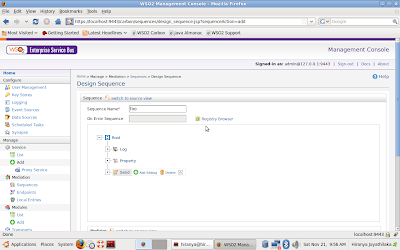
To create a new sequence, click on “Add Sequence”. This will bring up the on-line sequence editor. Start by giving a name to the sequence. Then go ahead and start adding mediators.
To further customize the behavior of a mediator instance click on the mediator and a dialog box will appear just below the sequence editor panel. Once you are done creating the sequence click on “Save” to save and close the editor. The newly created sequence will now show up on the list of available sequences.
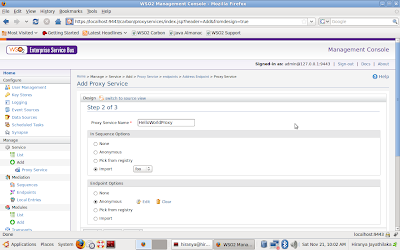
Ceating a proxy service is just as easy. Click on the Proxy Service link in the left panel to start the proxy service creation wizard.
Simply go through the 3-step wizard and specify an in-sequence, target endpoint, out-sequence and a fault sequence for the proxy service. When specifying these items you can either import an already existing sequence/endpoint or create one on the spot by selecting the “Anonymous” option.
Once you finish the wizard the new service will get created and deployed on the server. If you gave the name “FooProxy” to the service it will be exposed on the HTTP endpoint http://localhost:8280/services/FooProxy.
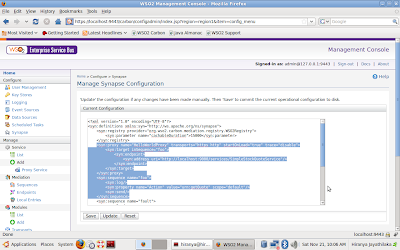
Now if you click on the “Synapse” link on the left navigation bar you can see that the overall ESB configuration has been updated with your changes.
The UI also allows you to enable statistics collection on sequences and proxy services, enable tracing on them and modifying their configuration. Play around with the various options available to you and get familiar with sequences, proxy services and the ESB management console. We will be using these a lot in the days to come.